
Recurly Integration is a WooCommerce extension that adds a Recurly payment gateway, a Recurly Subscription product type, and Recurly.js Elements on checkout. Recurly is the billing engine; WooCommerce stays the storefront.
Requirements
- WordPress 6.2 or higher
- WooCommerce 8.0 or higher
- PHP 7.4 or higher
- A Recurly account and private API key (Recurly Admin → Integrations → API Credentials)
Install and license (Pro)
- Buy Recurly Integration on munjr.com. After checkout you receive a Munjr license key (munjr.com bills plugin licenses through Chargebee; the key is that Chargebee subscription ID).
- Install the plugin zip on the WordPress site where you sell subscriptions.
- Go to Settings → Munjr License.
- Paste the key into Munjr license key and click Activate license. One site per subscription.
Free edition
Recurly Integration (Free) is Munjr Subscriptions with Recurly for WooCommerce, available on munjr.com. It does not use a Munjr license. Checkout, plan creation, trials, shipping, and tax work the same way as the licensed plugin. A paid Recurly renewal creates a WooCommerce fulfillment order. Plan fields lock after the plan is created, and plan-change webhooks are ignored. Installing the licensed plugin deactivates the free one and keeps the Recurly settings.
When we publish a new plugin version, the zip on your munjr.com order download is replaced. See the changelog.
Where the license lives (Pro)
munjr.com sells both plugins through Chargebee. Recurly Integration uses that Chargebee subscription ID as the license key — not a Recurly API key.

Setup and configuration
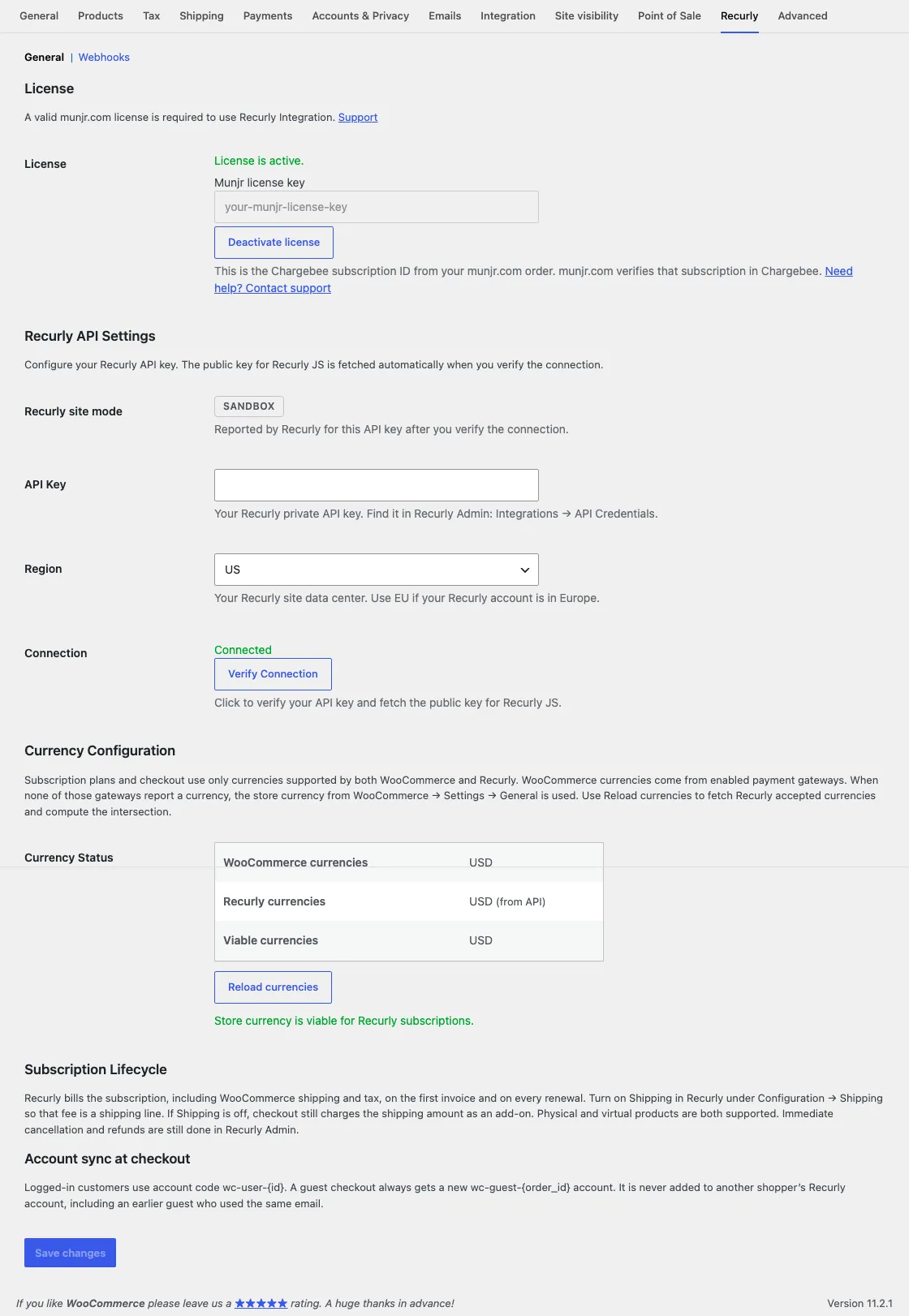
Open WooCommerce → Settings → Recurly.
Recurly API
- Enter your Recurly private API key.
- Set Region to US or EU to match your Recurly data center.
- Click Verify Connection. The plugin validates the key and fetches the public key used by Recurly.js. A site-mode badge (Production, Sandbox, or Development) appears after a successful verify — there is no separate sandbox toggle; the API key determines the Recurly site.
- Click Save changes.
- Enable the Recurly gateway under WooCommerce → Settings → Payments. It only appears at checkout when the cart contains Recurly subscription products.

Currency
Plans and checkout use only currencies supported by both WooCommerce and Recurly. Click Reload currencies after you verify the connection. If your store currency is not in the viable set, subscription checkout is blocked until you align currencies.
Create a subscription product
- Create or edit a WooCommerce product.
- Set Product type to Recurly Subscription (also offered on WooCommerce → Home → Add products).
- Open the Subscription Plan Config tab.
- Configure the fields below. Keep the product in Draft until Recurly creates the plan, then publish.
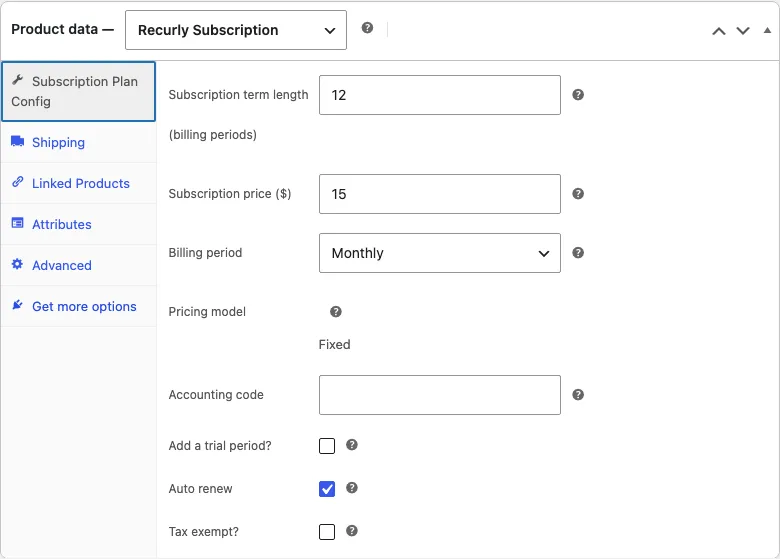
| Field | What it does |
|---|---|
| Subscription term length | Number of billing periods (for example 12). Sent to Recurly as total billing cycles. |
| Subscription price | Recurring price per period in the store currency. |
| Billing period | Monthly, every 3 months, every 6 months, yearly, or a custom interval in days or months. |
| Accounting code | Optional. Max 20 characters: letters, numbers, underscore, plus, hyphen. |
| Add a trial period? | Optional trial length and unit. Trial requires billing info controls whether Recurly.js collects a card for a $0 trial. |
| Auto renew | If on, Recurly renews at term end. If off, the subscription expires at the end of the term. |
| Tax exempt? | Whether Recurly applies tax on the plan. |
On save, the plugin creates a Recurly plan with code wc-{product_id} and description Created via WooCommerce Recurly Integration – Product #{id}.
Two-way plan sync is Pro
Saving a product that already has a plan pushes that product to Recurly. An updated-plan notification from Recurly pulls the plan back into WooCommerce. The free edition locks plan fields after creation. Use Sync from Recurly to pull the plan into WooCommerce. Plan webhooks are ignored on the free edition.
On Pro, the first save creates the Recurly plan. Later saves update that plan’s name, price, term, trial, and tax settings. A shopper who signs up after the save is billed from the updated plan. Recurly does not change the price of a subscription that already exists when only the plan changes, so the plugin also schedules a change on each current subscription for the next bill date. Active, future, and paused subscriptions are included. Canceled subscriptions are left as they are.
Recurly returns subscriptions 200 at a time and does not filter that list by plan. The plugin requests each following page and updates every subscription on this plan. If a subscriber cannot be updated, the product save says how many succeeded and why the rest failed. It does not report that the save fully worked.
The next renewal is the new plan price, the same shipping that subscription already pays, and tax calculated on the new price. Shipping tax stays with the shipping amount. A new signup after the change pays that same combination.
A trial stays at $0 until the trial ends. Shipping and tax are not on the trial invoice. They are scheduled for the first bill after the trial. A price change keeps that schedule. The first renewal after the trial is the new price, the same shipping, and tax worked out on the new price. A later price change, before that renewal, scales tax from the price already scheduled. Tax does not stack. After any number of edits, the renewal tax is the tax a new signup pays. Before this fix, that first renewal dropped shipping and tax and billed only the plan price, and other subscribers kept tax calculated on the old price.
If the product is on sale, Recurly bills the sale price. Saving the product does not put the regular price back, and an updated-plan webhook does not either. Shoppers keep seeing the sale, and that is the price they pay on the next renewal.
Recurly does not allow the billing interval of an existing plan to change. Changing the period, such as Monthly to Yearly, creates a new Recurly plan on that interval and moves current subscribers onto it at the next bill date, including subscribers in a trial. WooCommerce shows the period that Recurly bills. If Recurly does not accept the new plan, the product stays on the previous period and the save says so.
The other direction is the updated-plan webhook. When the plan changes in Recurly, Pro updates the matching WooCommerce product: name, selling price, billing period, term, and trial settings. A sale price is kept. The free edition ignores that webhook.
If plan creation fails, the product stays in Draft. Fix the settings and click Retry plan creation or Publish again.
Trials
When a trial is enabled, the cart and order show a $0.00 line with a trial label, and shop/product pages show a Free X days|months trial badge. Recurly still creates the subscription using the plan and trial you configured. WooCommerce Blocks product grids may not show the badge.
The subscription price is $0 during the trial. Shipping for a physical subscription is still charged on the signup invoice, and checkout asks for a card before that subscription is created. Tax on the plan is collected when the trial ends, together with the plan price and the next period’s shipping. A virtual subscription has no shipping line.
Checkout
- Add a Recurly Subscription product to the cart.
- On checkout, select Credit Card (Recurly).
- Enter card details in the Recurly.js Elements fields and place the order.
The card is tokenized in the browser and never touches your WordPress server. WordPress creates or reuses a Recurly account and creates the subscription.
Logged-in customers always use Recurly account wc-user-{user_id}. Every guest order gets its own account, wc-guest-{order_id}, even when the email matches a registered customer or an earlier guest. Billing address from the order is sent to Recurly.
A subscription and a one-time product
Pro only
Freemium blocks a cart that mixes a subscription with a one-time product.
On Pro, that cart is allowed. Recurly bills the subscription. The payment method chosen at checkout bills the one-time products.
Signup discounts
Pro only
Freemium rejects WooCommerce coupons on every subscription cart.
On Pro, a WooCommerce coupon, or a Recurly coupon, can discount the first invoice. The Recurly plan price stays the renewal price. A fixed coupon larger than the amount due today is rejected.
My Account
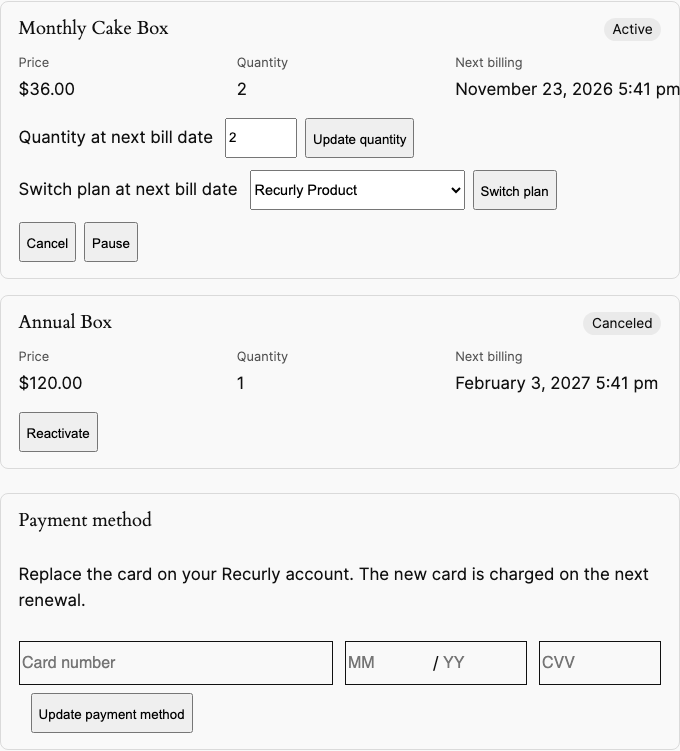
Logged-in customers get My Account → Manage Subscriptions (/my-account/recurly-subscriptions/). Both editions list the subscriptions on Recurly account wc-user-{id}. A customer can cancel at the end of the current billing period, or reactivate a subscription that is set to cancel. Immediate termination and account closure stay in Recurly Admin.
If that URL returns 404, open Settings → Permalinks and click Save once.
Payment method
Pro only
Freemium does not include a card update. Cancel and reactivate are in both editions.
On Pro, the same page has a Payment method form. The customer enters a new card. Recurly.js tokenizes it in the browser, and the plugin replaces the card on wc-user-{id}. The new card is charged on the next renewal.
Quantity and plan changes
Pro only
Freemium does not let the customer change quantity or switch plans.
On an active subscription, the customer can set a new quantity or choose another subscription product sold in the store. Both changes apply at the next bill date. The current period is unchanged. The next renewal uses the new quantity or the new plan.
Pause and resume
Pro only
Freemium does not include pause or resume.
Pause skips one billing cycle. The subscription shows as Paused, and Resume puts it back. Cancel is separate: it stops renewal at the end of the current period and can be undone with Reactivate until that period ends.
How billing works
Recurly is the billing system of record after the first purchase. This plugin creates the subscription at checkout. Immediate termination and account closure stay in Recurly Admin. Dunning and payment retries stay in Recurly. On Pro, a failed renewal is recorded in WooCommerce, and a refund can be started from the WooCommerce order.
Each physical subscription is billed its own shipping amount. A virtual subscription is not billed shipping. Shipping and tax for that subscription are sent to Recurly as recurring add-ons. Recurly bills the WooCommerce sale price when the product is on sale.
WooCommerce calculates shipping and shipping tax. Recurly does not recalculate them. A quantity of 2 or more is one Recurly subscription. The invoice shows that quantity, and the price is the unit price multiplied by it. The WooCommerce order keeps the same quantity and line total. When the tax does not divide into even cents per unit, Recurly is sent the WooCommerce tax total. Shipping, tax on the subscription, and tax on shipping are separate billable add-ons. Each uses the subscription quantity when the amount divides evenly, so two packages show as quantity 2 at the per-package shipping rate, and shipping tax is its own line. Recurly prints every add-on on a trial invoice at $0 and labels it “Trial period for …”, including tax. That $0 tax line is the recurring tax add-on, not another charge for the trial. The plugin does not attach those add-ons when it creates a trial subscription. It schedules them for the next bill date. Shipping and shipping tax that are due today are purchase line items (POST /purchases) on the signup invoice, with the subscription quantity. A renewal shows the shipping add-on plus a tax line for the subscription and a tax line for shipping. When there is no trial, the add-ons are charged on the first invoice. Each physical subscription is billed its own shipping fee and its own shipping tax. A virtual subscription has neither. If scheduling the renewal add-ons fails after Recurly has charged the signup, or if the new subscription cannot be loaded after that charge, checkout still completes and the order keeps the subscription. Placing the order again does not create a second subscription or a second charge.
Both editions listen for a paid renewal invoice and create one WooCommerce order for that invoice, shipped to the subscription’s shipping address, so a physical renewal can be fulfilled. A failed renewal payment does not create a fulfillment order.
Failed renewals
Pro only
Freemium does not record a failed renewal in WooCommerce.
On Pro, a past-due or failed renewal invoice is noted on the original WooCommerce order and emailed to the store. My Account shows that subscription as Past due. No second fulfillment order is created.
Refunds
Pro only
Freemium does not refund a Recurly invoice from WooCommerce.
On the WooCommerce order, the Recurly box lists the account, subscription, and invoice. Enter an amount and choose Refund Recurly invoice. Recurly refunds that invoice first. WooCommerce records the same amount only after Recurly accepts it. The amount cannot be larger than the remaining WooCommerce balance. Immediate termination and account closure are not part of this action. Those stay in Recurly Admin.
On Pro, saving the product updates the Recurly plan, and an updated plan notification updates the WooCommerce product. A price change is scheduled on live subscriptions for the next bill date. The free edition does not push later plan edits and ignores plan webhooks.
Limitations
- On Freemium, WooCommerce coupons cannot be used when the cart contains Recurly subscription products. On Pro, a coupon can discount the first invoice. The plan price stays the renewal price.
- On Recurly Integration Pro, a cart can contain a subscription and a one-time product. Recurly bills the subscription, and the payment method chosen at checkout bills the one-time products. The free edition blocks mixed carts.
- Variable / matrix products are not supported.
- Ramp pricing is not supported (fixed price per period only).
FAQ and troubleshooting
Verify Connection fails
Use a private API key from Recurly Admin → Integrations → API Credentials, and match the Region (US/EU) to that Recurly site.
No Recurly card fields on checkout
The cart must contain a Recurly Subscription product, the Recurly gateway must be enabled, and the connection must be verified (so the public key exists). Mixed carts hide the gateway.
Plan creation failed
Open the product, read the error on Subscription Plan Config, confirm the store currency is viable, then Retry plan creation.
License will not activate (Pro)
Use the Munjr license key from your munjr.com order — not a Recurly API key. Each subscription licenses one WordPress site.
Changelog
Newest version first. When we ship an update, the zip attached to your munjr.com order download is replaced.
2.1.1 — November 4, 2026
- Pro. A later price change before the renewal keeps the tax a new signup would pay. It does not add tax from the previous edit. Shipping stays the same.
2.1.0 — November 3, 2026
- Pro. After a price change, every subscriber on the plan renews at the new price plus the same shipping and tax a new signup pays. That includes trials. Recurly lists subscriptions 200 at a time and does not filter by plan, so the plugin requests each following page. Tax is calculated on the new price. If a subscriber cannot be updated, the save says how many succeeded and why the rest failed.
- Pro. Saving a product, or receiving an updated-plan webhook, keeps the sale price shoppers see and pay.
- Pro. Changing the billing period creates a Recurly plan on that interval and moves current subscribers onto it at the next bill date. Recurly does not allow the interval of an existing plan to change. WooCommerce shows the period Recurly bills.
2.0.0 — November 2, 2026
- Pro. A cart can contain a subscription and a one-time product. Recurly bills the subscription. The selected payment method bills the one-time products.
- Pro. A WooCommerce coupon reduces the amount due today. The Recurly plan price stays the renewal price. A coupon larger than the amount due today is rejected.
- Pro. My Account can replace the card, change quantity, switch plan at the next bill date, pause, and resume.
- Pro. A past-due or failed renewal is noted on the existing WooCommerce order. It does not create a fulfillment order.
- Pro. Refund a Recurly invoice from the WooCommerce order. WooCommerce records the refund after Recurly accepts it.
1.3.1 — November 2, 2026
- Pro 1.3.1 and free edition 1.2.1. If loading the new subscription fails after Recurly has charged the signup, checkout still completes. The order keeps that subscription. Placing the order again does not create a second subscription or a second charge.
1.3.0 — October 29, 2026
- Pro. Saving a subscription product updates the Recurly plan. A new price is applied to active, future, and paused subscriptions at the next bill date. An updated plan notification from Recurly updates the WooCommerce product.
- Free edition 1.2.0. A paid Recurly renewal creates a WooCommerce fulfillment order. Plan fields stay locked after creation, and plan webhooks are ignored.
1.2.4 — October 28, 2026
- A quantity of 2 or more is one Recurly subscription. The invoice quantity matches the WooCommerce quantity, and the price is the unit price multiplied by that quantity. The WooCommerce order keeps that quantity and total.
- Shipping, subscription tax, and shipping tax are separate add-ons at the subscription quantity. A quantity of 2 shows shipping as two charges at the per-package rate, and shipping tax as its own line.
- Recurly would list each of those add-ons on a trial invoice as “Trial period for …” at $0, including tax. That $0 tax line is the recurring tax add-on, not another charge for the trial. The add-ons are scheduled for the next bill date. The signup invoice charges shipping and shipping tax as purchase line items.
- A renewal shows the shipping add-on plus a tax line for the subscription and a tax line for shipping.
1.2.3 — October 28, 2026
- WooCommerce calculates shipping tax. On a free trial, that tax is a line item on the Recurly purchase, so the signup invoice collects it. The shipping fee stays on the Recurly shipping line when Recurly Shipping is available.
- When Recurly Shipping is not available, the purchase includes the shipping fee and the shipping tax. Later renewals still use the shipping and tax add-ons.
- Each physical subscription in one order is billed its own shipping fee and its own shipping tax.
1.2.2 — October 26, 2026
- Each subscription in one order is billed its own tax. Each physical subscription is billed its own shipping. A virtual subscription has no shipping line.
- A free trial with shipping due today collects a card before the subscription is created.
- Pro. A paid renewal invoice creates the WooCommerce order from the subscription on that invoice, and the order uses the subscription shipping address.
1.2.0 — October 25, 2026
- Recurly bills the WooCommerce sale price.
- When one subscription in an order fails, tax from that line is not sent to Recurly. Shipping and tax stay on a subscription Recurly accepts.
- After a free trial, the renewal includes WooCommerce tax on the plan price.
- A free trial that does not require a card still creates the Recurly subscription. A guest order is never added to an earlier guest’s Recurly account.
- Pro. Renewal orders are created once per paid renewal invoice and include the shopper’s email and address.
1.1.0 — October 20, 2026
- Subscription carts can only be paid with Recurly.
- A guest who enters a registered customer’s email gets a separate Recurly account.
- Shipping is stored on the Recurly subscription and tax is a recurring add-on, so renewal invoices still include both.
- Both editions. WooCommerce → Settings → Recurly → Webhooks shows the renewal webhook URL. A received test does not create an order. Plan notifications update the product on Pro only.
The free plugin’s current release is 1.2.1. It includes the same quantity handling, the same shipping and tax add-ons, and WooCommerce orders for paid renewals. A trial signup charges shipping and shipping tax as purchase line items, and those add-ons start on the next bill date. If loading the new subscription fails after the signup charge, checkout still completes and a retry does not charge again. Plan fields stay locked after creation. Two-way plan sync, mixed carts, signup coupons, card updates, failed-renewal notes, refunds, plan changes, and pause are Pro 2.0.0.
0.1.0
- Initial public release: Recurly.js Elements checkout, automatic plan creation, munjr.com licensing, and My Account subscription management.
Support
Questions about Recurly Integration, licensing, or an existing munjr.com subscription: Contact us. We typically respond within two business days. You can also follow all plugin docs.