
We’re excited to announce two new integrations—MailPoet and WPForms—powered by the InstaMail Verification plugin. InstaMail Verification is the engine that enables these integrations and makes it possible to run real-time email checks wherever you collect addresses. These are two of the most popular plugins in the WooCommerce and WordPress marketplaces, and the new integrations put the power firmly in your hands so you can decide exactly where and how verification happens.
Why does this matter? Email verification shouldn’t be limited to checkout and account registration. It should follow your customer journey wherever you collect an email—so you can block bad addresses before they reach your list, your CRM, or your automation stack. With InstaMail Verification enabling these integrations, you get broader coverage, finer control, and the same trusted verification rules you already rely on.
MailPoet: Verify at Every Subscription Touchpoint
MailPoet powers newsletters, subscriptions, and growth tools across the WordPress ecosystem. Now, when customers sign up for your list—whether it’s through a classic newsletter form, a splash popup, or embedded signup blocks—InstaMail Verification can run instant verification before the subscription is accepted. If your verification rules are set to block an email, the MailPoet integration will block the subscription submission, keeping low-quality addresses out from the start.
WPForms: Choose the Exact Forms and Fields to Verify
WPForms is one of the most widely used form builders in WordPress, and now you can bring verification into any form workflow you design. The integration—enabled by InstaMail Verification—lets you pick which forms to enable and which specific email fields to validate. If verification is set to block a particular email result, the WPForms integration will stop that form submission from going through—just like it does with MailPoet.
How to Enable Integrations
Step 1: Go to WooCommerce → Settings → InstaMail Verification → Integrations.
Step 2: Toggle MailPoet or WPForms to “Enabled.”
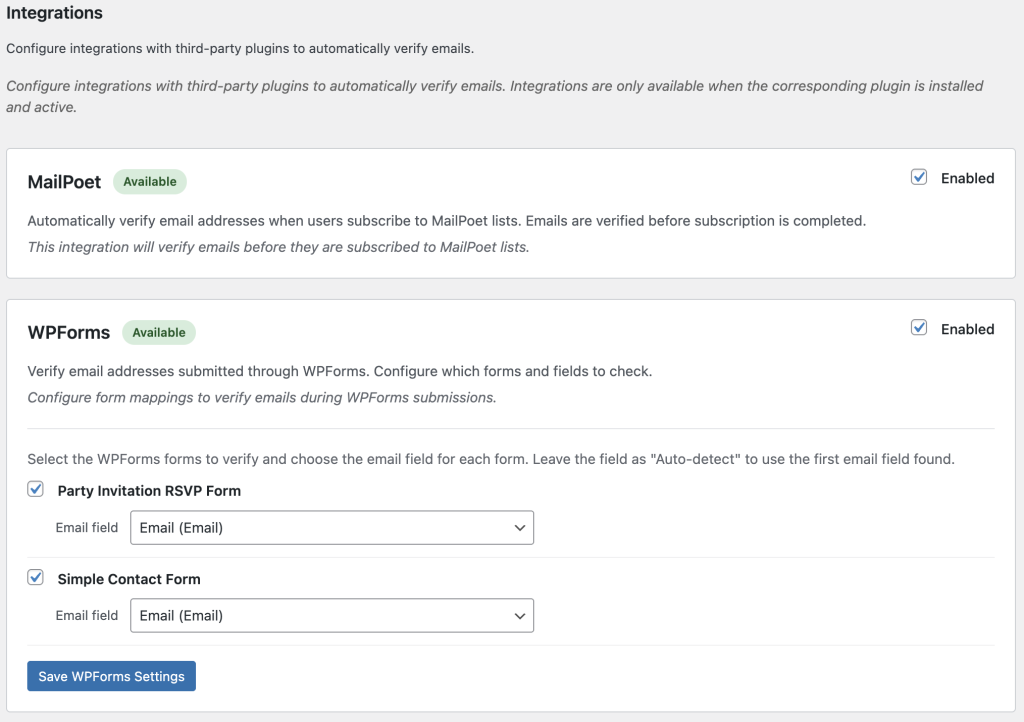
WPForms Setup: Enable Verification Per Form
Step 1: In the Integrations panel, enable WPForms.
Step 2: You’ll see a list of available WPForms. Check the box for each form you want to verify.
Step 3: For each enabled form, choose the email field to verify. (You can leave it on Auto-detect to let the integration pick the first email field it finds.)
Step 4: Click Save WPForms Settings.
That’s it—verification is now active for the selected forms and fields. If a submission fails verification and your rules are set to block, the form submission will be stopped immediately.
Get Started
Ready to enable the new integrations and configure your verification rules? Visit the documentation to get started and explore everything you can do with InstaMail Verification for WooCommerce. Learn more here.
Source cited: https://woocommerce.com/products/instamail-verification/