

We’re thrilled to introduce this new feature that extends Kickbox’s powerful Batch Email Verification Processing API to the Kickbox Integration for WooCommerce!
What is Batch Email Verification?
Batch Email Verification is a powerful new feature in the Kickbox Integration plugin that allows you to verify large number (up to 1 million!) email addresses at once using Kickbox’s industry-leading Batch Verification API. Whether you’re preparing for a major product launch, cleaning up your customer database, or validating a new marketing list, this feature gives you the power to ensure every email you send has the highest chance of reaching its destination.
Why it matters: The Email Deliverability Crisis
Let’s talk numbers. Did you know that:
- 64.6% of businesses say email deliverability issues have directly impacted revenue or customer retention, underscoring the real-world cost of poor email hygiene.
- Spam filtering is the top inbox barrier for nearly 60.3% of businesses, making it the most urgent deliverability challenge to address.
- Only 23.6% of businesses verify their email lists before every campaign—leaving many vulnerable to bounces, spam traps, and disengaged subscribers.
- Approximately 9% of emails entered on webforms are invalid, meaning nearly 1 in 10 leads could be fake, mistyped, or undeliverable—resulting in bounces & missed opportunities to connect with real customers.
Source: Kickbox’s Email Deliverability Report
For store owners running email marketing campaigns, this isn’t just an inconvenience—it’s a direct hit to your ROI, brand reputation, and customer engagement.
✨ Key Features
📊 Real-Time Progress Tracking
Watch your verification job progress in real-time with beautiful, intuitive progress bars showing:
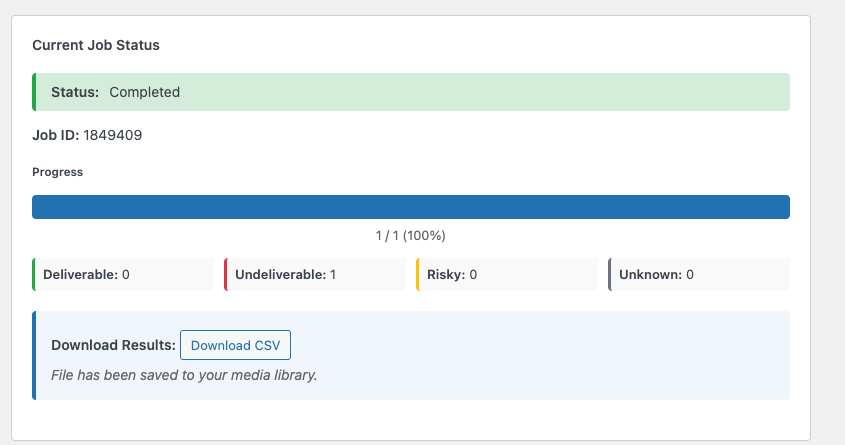
- Deliverable emails – Your golden list of verified, send-ready addresses
- Undeliverable emails – Invalid addresses you can remove to protect your reputation
- Risky emails – Addresses that might cause deliverability issues
- Unknown emails – Addresses that need further investigation
No more guessing. You’ll know exactly what you’re working with before you hit “send.”
Flexible Email Input
We’ve made it incredibly easy to verify any list of emails:
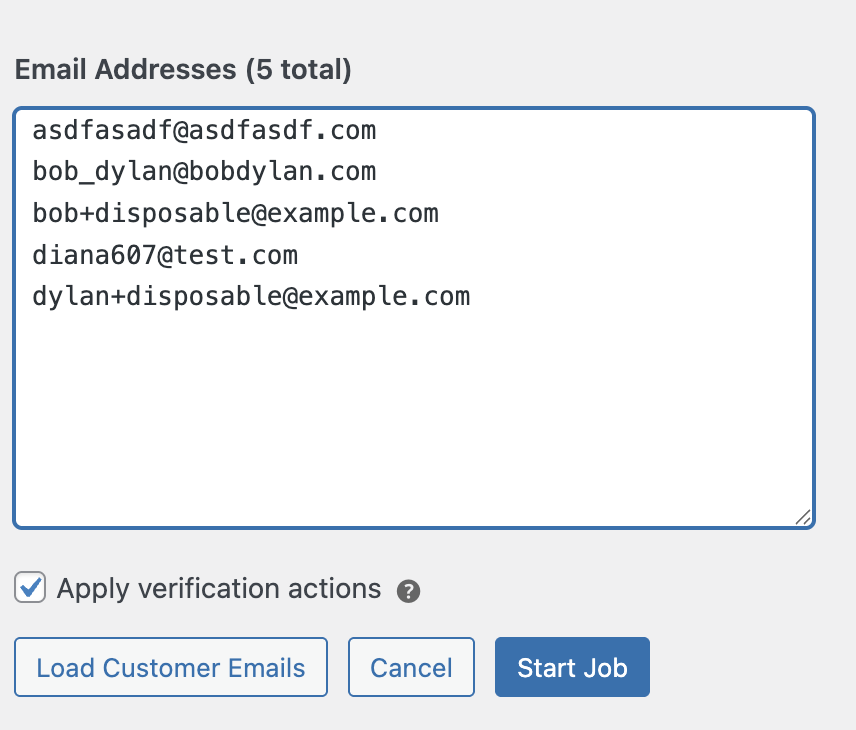
- Paste from anywhere: Copy emails from spreadsheets, CRM systems, or anywhere else—we’ll automatically handle commas, semicolons, tabs, or newlines
- Load existing customers: One-click button to pull all your WooCommerce customer emails
The interface intelligently normalizes your input, so you can focus on what matters: getting your campaigns out the door.
🎛️ Smart Verification Actions
Here’s where it gets really powerful. When you enable “Apply verification actions,” the system automatically:
- Logs all verification results to your database for future reference
- Flags problematic emails based on your configured rules (block, review, or allow)
- Maintains a complete audit trail of every verification
Want to verify without applying actions? No problem! You can run verification jobs in “read-only” mode to analyze your lists without making any changes to your database.
📥 Complete Results Export
Once your batch verification completes, you get:
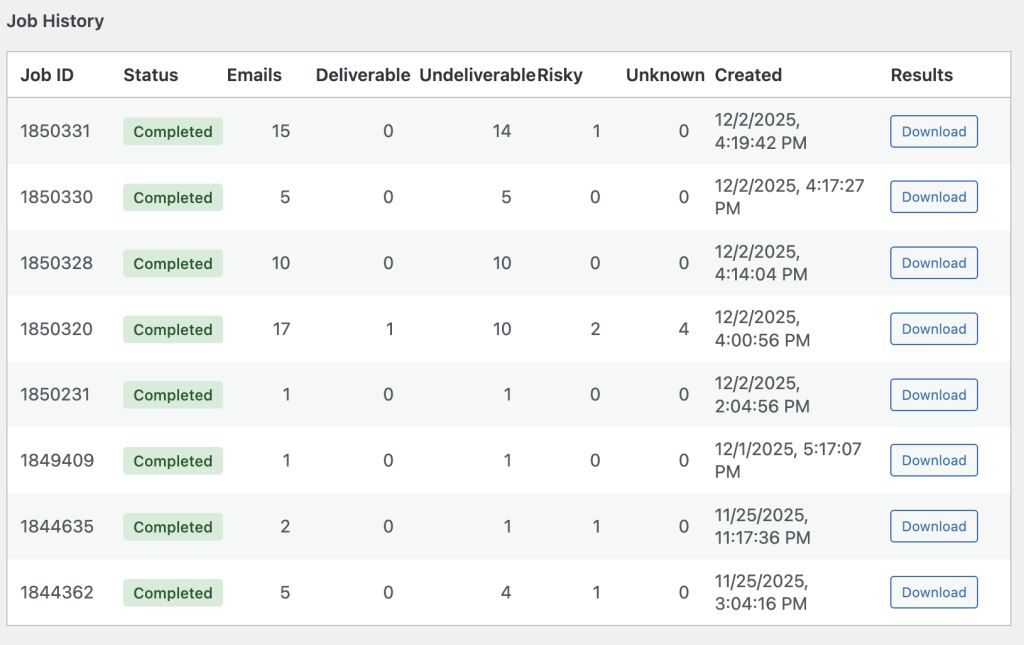
- CSV file automatically saved to your WordPress media library
- Downloadable results with full verification details for every email
- Job history so you can track all your verification campaigns
- Detailed statistics showing exactly what percentage of your list is deliverable
Perfect for Marketing Campaigns
Pre-Campaign List Hygiene
Before launching your next big campaign:
- Verify your entire customer list to identify invalid addresses
- Remove undeliverable emails to protect your sender reputation
- Review risky addresses before they cause problems
- Export clean lists for your email marketing platform
Result: Higher open rates, lower bounce rates, better deliverability, and more sales.
Product Launch Preparation
Planning a major product launch? Use batch verification to:
- Validate your VIP customer list before sending exclusive offers
- Clean subscriber lists from lead magnets and opt-ins
- Verify partner email lists before co-marketing campaigns
- Ensure maximum deliverability when it matters most
Regular List Maintenance
Make batch verification part of your monthly routine:
- Clean up your database by removing invalid addresses
- Identify risky emails before they damage your reputation
- Maintain high sender scores with ISPs and email providers
- Save money by not sending to addresses that will never convert
🚀 How to Get Started
Getting started with Batch Email Verification is incredibly simple:
- Navigate to WooCommerce > Settings > Kickbox > Batch Verification
- Click “Create New Batch Verification Job”
- Enter your email list (or click “Load Customer Emails” to verify all customers)
- Choose whether to apply verification actions (recommended for most use cases)
- Click “Start Job” and watch the magic happen!
The Bottom Line
Batch Email Verification isn’t just a feature—it’s a competitive advantage. In an era where email deliverability can make or break your marketing campaigns, having clean, verified lists is no longer optional. It’s essential.
Whether you’re:
- 🎯 Preparing for a major product launch
- 📧 Running regular email campaigns
- 🧹 Cleaning up your customer database
- 📊 Analyzing list quality
- 💰 Maximizing your marketing ROI
Batch Email Verification gives you the tools you need to succeed.
🎉 Ready to Transform Your Email Marketing?
Don’t let invalid email addresses hold your campaigns back. Start using Batch Email Verification today and experience the difference that verified, deliverable email lists can make for your business.
Your customers are waiting. Your campaigns are ready. Your emails will deliver.
Get started now: WooCommerce > Settings > Kickbox > Batch Verification